
React Native vs Native: How We Choose the Right Stack
Choosing between React Native and native is rarely a one-time decision. The right stack depends on what the product needs to do, how fast it has to launch, and how the team expects it to grow. Factors like performance, budget, access to platform features and long-term maintenance carry different weight at each stage of the product’s life.
By building mobile apps with React Native, Swift, Kotlin, and hybrid approaches, we have gained clear insight into balancing shared-code efficiency with the dedicated control native development offers.
In this post, we walk through the five questions we ask before choosing a stack, the three approaches we pick from, and how those answers changed for Gobi, a social app for discovering places and events that we moved from React Native to native iOS and Android, step by step.
What we look at before choosing a stack
To make those trade-offs concrete, we work through five questions:
- What needs to be shipped and by when?
We compare the scope of the release, the deadline, and the budget with the amount of work involved for each approach; although React Native and EAS can make distribution easier by allowing compatible JavaScript and asset updates to be carried out over the air, changes at the native level require a new build, and the estimate takes into account any framework workarounds and the expected migration. - What is holding the current app back?
We check for crashes, freezes, low frame rates, and slow responses. Before suggesting a migration, we find out if the problems come from UI rendering, state management, data loading, or the backend. The main question is whether these are one-off issues or ongoing problems that mean the architecture should change. - What are the core features, and how do they work?
We look at the complexity of the features, the amount of data, and how frequent interactions or the arrival of new data cause coordinated UI updates. We also consider how much work has to be carried out within each animation frame and what needs to be moved to background threads in order to keep the interactions responsive. - Where is the product heading?
We want to know if the new features will boost the value of the shared user interface or instead call for more native control. React Native continues to be appealing since the new features make use of the shared screens and interaction patterns. The separate SwiftUI and Jetpack Compose interfaces can still share business logic via Kotlin Multiplatform, or reuse compatible Swift modules through the Swift SDK for Android. - What is currently in place and who will be responsible for maintaining it?
We review the current code, integrations, and the team’s experience. For a large React Native app, targeted native work might help. If a smaller project has major issues, it may be worth refactoring or migrating early. In both cases, the team needs an architecture they can support.
These questions help us choose an approach that fits the product’s workload, release goals, and the team’s ability to maintain it.
React Native, native, or both: three approaches
React Native as the foundation
React Native shares UI and app logic across iOS and Android, and its ecosystem shortens the path from idea to release. Ready-made libraries and Expo’s SDK make common features easier to implement, while Fast Refresh and React Native DevTools enable fast iteration and debugging. Through Expo’s EAS, builds and distribution are made simpler, and EAS Update can deliver compatible changes to the JavaScript code and assets over the air. Changes at the native level still require a new build. This method is especially suitable in the case where both platforms have a lot in common, and the team is able to benefit from frequent updates.
React Native with native modules
A hybrid approach combines that workflow with selected parts of the app implemented in native code. A feature implemented entirely in native code can manage its own data loading, state, and user interface while providing a limited interface for commands and results. This kind of arrangement is suitable for products in which shared screens are accompanied by specialized experiences such as interactive maps, media processing, or custom gestures. Each feature can make use of the implementation that is appropriate for it, and the combination can stay within the product’s long-term architecture.
Fully native app
Native apps provide direct access to the platform’s APIs and tools for concurrency, background processing, and animations. Hybrid features can use these as well. With a completely native architecture, the team can coordinate them across the whole app without relying on a JavaScript-to-native integration layer. This method is especially suitable when closely linked, demanding interactions account for a large part of the product, and the team needs flexibility in how data processing, rendering, and user input interact. Business logic can still be shared using Kotlin Multiplatform, along with separate SwiftUI and Jetpack Compose interfaces.
We consider both greenfield projects, where we build a new app from scratch, and brownfield projects, where we extend or adapt an existing one. Either can use React Native, native UI, or a mix of the two; the starting point will dictate how we introduce and then develop that architecture.
With a clear architecture, well-defined tasks, and reliable checks, AI coding agents can make implementation and optimization much faster across all three approaches. Experience across these stacks helps us identify where each brings the most value. Gobi illustrates how that balance can evolve as a product grows.
Gobi’s incremental migration from RN to native
Gobi is an application that allows users to discover, save, and rate places and events on an interactive map, with suggestions provided by an AI assistant; the results and details appear in draggable sheets above the map, so that the interface has to remain in sync as users explore.
When Gobi approached Software Mansion, the team was developing a React Native app and needed mobile development expertise to refine its core interactions, improve responsiveness, and support further product development.
As we worked on the app, we found problems with camera movement, marker rendering, sheet dragging, scrolling, and keyboard handling. Navigation and search at times appeared to be sluggish, and frame-rate drops meant that the app did not have the smooth 120 FPS experience the team had envisioned for Gobi. Overall, it fell short of our expectations for polish and responsiveness. We began addressing these issues with targeted native improvements within the existing React Native app.
While improving Gobi’s bottom sheets, we created React Native Bottom Sheet, which handles sheet movement and gestures in native code while hosting React Native content. This gave us finer control over how dragging a sheet flows into scrolling its content. The library is open source, so you can use it in your own React Native app.
We then developed our own native map module, which gave us greater flexibility with regard to markers, camera movement, and app-specific optimizations. By handling the map’s data and its interactions in native code, we were able to attain the desired 120 FPS experience without decreasing the number of items shown on the map.
By then, we were maintaining a growing set of native modules behind a React Native surface. Each one carried its own bridging layer of adapters, shared state, and behavior that had to match on both sides, and every demanding feature still on Gobi’s roadmap would need the same treatment again. Weighed against the work ahead, maintaining that bridge and building the next features across two layers was going to cost more than moving the existing code into native once. So, we chose to migrate the whole app to Swift and Kotlin.
We migrated in stages. Initially, the native content was included within React-controlled sheets; afterward, the native code took over responsibility for navigation and the surrounding containers, while the existing React Native components stayed available within the native app until their replacements were ready. We called these embedded views React islands. We moved features and shared state gradually, withdrawing each island once its native version had taken over. Clear plans and AI coding agents supported the migration, all while new features were still being released. When no features depended on React, we removed its runtime and completed the transition to native iOS and Android apps.
Not every app needs a migration
Gobi is one point on a wider spectrum. In most of the apps we work on, React Native stays the foundation, and native code goes exactly where the product needs it. At Filament, an invite-only chat platform, the WebView-based editor couldn’t keep up, so we built a fully native rich text input, now open source as React Native Enriched. We also moved Android notification handling to native code, so encrypted messages no longer had to wait for the full JavaScript runtime to start. The app itself stayed in React Native, with one codebase for iOS, Android, iPad layouts, and a web version built with the same Metro setup. Targeted work on message encryption and syntax highlighting cut Android cold start from 6–10 seconds to around 800 ms and reduced the app size by over 30%.
Sometimes the right answer sits elsewhere on that spectrum. When SeaPeople struggled with crashes and battery drain, the stack wasn’t the cause. The problems came from background task handling and a screen that re-rendered every second. Fixing them within React Native cut CPU usage on an iPhone 13 from 170% to 30% and raised the crash-free rate from 95% to around 99%. We also helped the product grow: A two-person team built the first version of the new Groups feature in two weeks.
Vibecode went the other way from the start. Because the product runs apps generated by its users, we built a native SwiftUI iOS app and embedded React Native as a contained environment for those apps. Here, React Native’s ability to load JavaScript bundles at runtime is the feature itself: Each generated Expo app ships as a JavaScript bundle that the host app fetches, caches, and runs, and React Native’s Element Inspector gives the AI agent structured information about the UI it is editing. It works much like the React islands from Gobi’s migration, only as a permanent architecture.
Our takeaway
The technology you choose should suit the product you plan to build; when deciding on an approach, start with the product’s core features, release objectives, expected growth, and the team involved.
How to decide for your app:
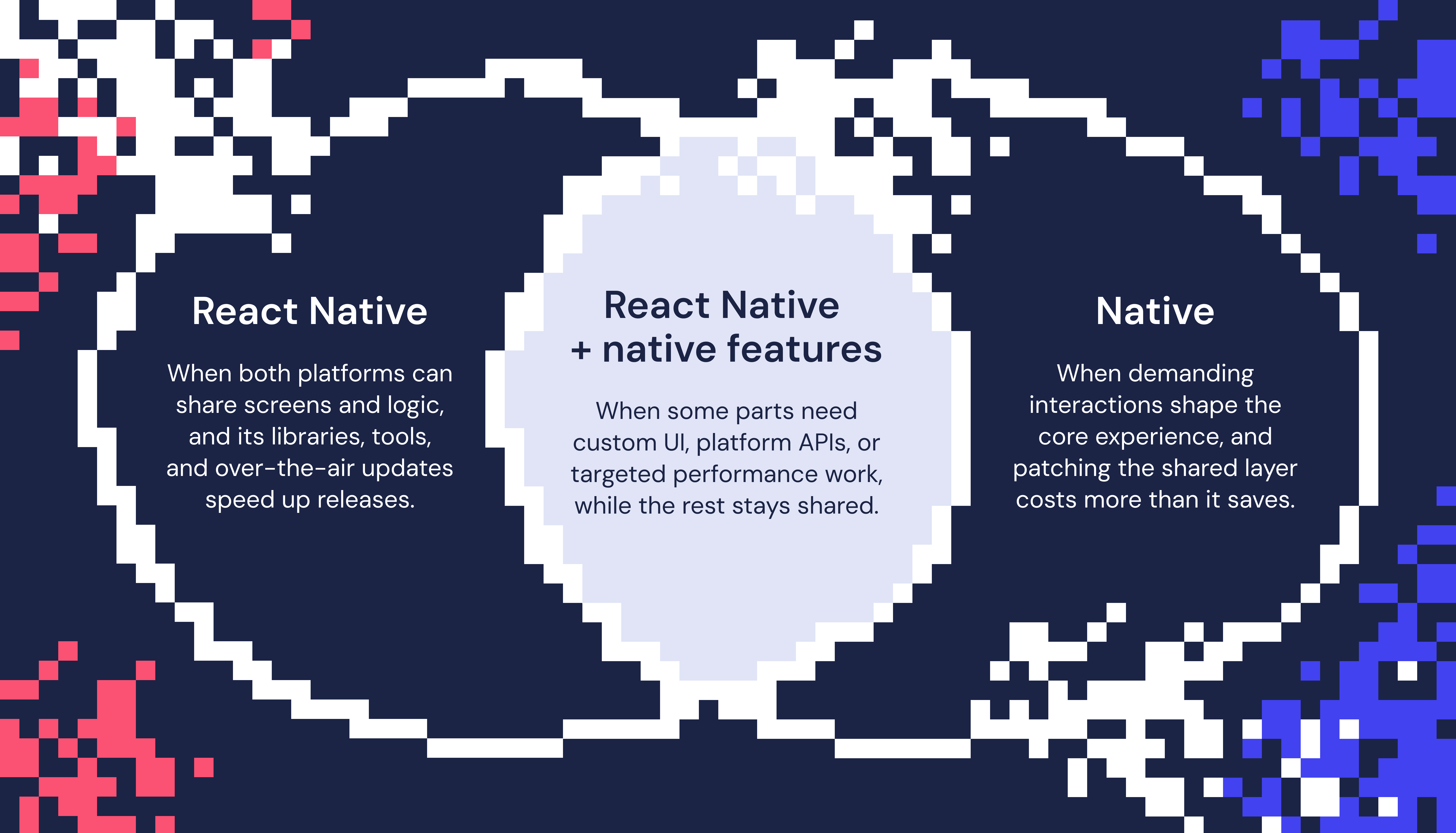
Choose React Native when you want to share screens and logic across platforms, accelerate development, testing, and releases with its ecosystem of tools and libraries, and keep the flexibility to extend the app as the product grows.
Add native integrations when selected features benefit from custom UI, platform APIs, or targeted performance work. This can include rendering, animations, and intensive data processing. The rest of the app can remain shared.
Consider fully native development when direct platform control is valuable across much of the app. This may involve heavy data processing or frequent, coordinated interactions. For existing products, compare the work needed to meet the same requirements through targeted improvements or migration. Include testing and ongoing maintenance in both estimates.
Migrate gradually when a transition makes sense, keeping existing React Native views available inside the native app until their replacements are ready. This helps keep the transition invisible to users while the team continues fixing bugs and releasing new features, as we did with Gobi.
We bring that same approach to our work at Software Mansion, drawing on experience building mobile apps and the libraries behind them to help teams choose technologies and guide transitions as their products grow.
FAQ
What are the benefits of building an app with React Native?
React Native lets you build native apps for both iOS and Android, letting teams share UI and business logic across platforms. The libraries, developer tools, and Expo services all contribute to speeding up development and allowing for quick iterations. If a feature makes use of custom native code, then Swift or Kotlin modules and components can be integrated when needed without losing the flexibility of a shared codebase.
React Native vs Swift and Kotlin: when is native a better fit?
Native development is appropriate when custom interactions, continuous data processing, or deep platform integration are key to the experience. It enables teams to have direct control over rendering, concurrency, and the platform APIs in order to optimize demanding workflows. With a well-defined architecture and common behavior contracts, AI coding agents can speed up implementation and testing on multiple platforms. Business logic can still be shared using Kotlin Multiplatform, with SwiftUI and Jetpack Compose being used for each platform’s user interface.
Can you mix React Native and native code?
Yes. Native modules expose native APIs and logic, while native components expose native UI, using interfaces such as Turbo Native Modules and Fabric Native Components. The integration can range from a small capability to an entire feature with native data handling, logic, and UI. It also works in reverse: A native app can host React Native views or flows as React islands, as Gobi did during migration. This flexibility lets us choose which responsibilities stay shared and which move to native code.
Kotlin Multiplatform vs React Native: which should you choose?
Choose React Native when you want one codebase for your UI and your logic, backed by a very mature library ecosystem, a large community, and OTA updates. The shared UI renders native platform components on both iOS and Android, Fast Refresh shows changes instantly, and AI coding agents know it well thanks to the amount of public React Native code.
Choose Kotlin Multiplatform when the questions above point to native development, but you still want to share code. Shared Kotlin code compiles to JVM bytecode on Android and native machine code on iOS, so shared logic runs at native speed and keeps the app size smaller. Kotlin also has strict type safety and supports true multithreaded execution through coroutines and dispatchers, so you can run CPU-intensive tasks in parallel. You can share just your business logic and keep separate SwiftUI and Jetpack Compose UIs, or share the UI as well, for example with Compose Multiplatform.
The two can also work together: A React Native app can use Kotlin Multiplatform logic through native modules.
Can you help with an existing app?
Yes. We look at your app as it is, whether it’s native (Swift, Kotlin) or cross-platform (React Native, Flutter, Kotlin Multiplatform), and help you choose the next step: focused improvements, native integrations, or a gradual migration like Gobi’s. The migration happens alongside new features, not instead of them. Keep your product moving forward. Let’s talk about your app.
Give your app room to grow
Your product will have its own challenges. Share your plans with Software Mansion, and we’ll help you turn them into a practical path forward, whether you’re preparing your first release or ready to take an existing app further.